
Customer Area
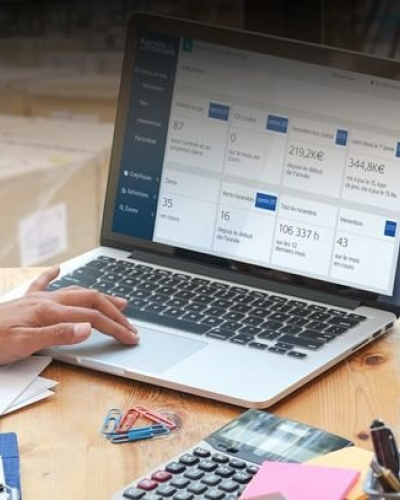
With Espace Client, our fleet management solution, you have a decision-making tool at your disposal. Improve efficiency and safety by managing your fleet of handling equipment.
Designed by and for our customers
Customer Area is a fleet management tool that provides a comprehensive overview of all your equipment, regardless of make or model.
Customer Area demonstrates Aprolis' commitment to its customers and provides the best guarantee of satisfaction with our service.
All modules were created and validated by our customers based on their daily needs. You too can contribute to our improvement.
Analyze and optimize your equipment fleet
Whether your company is located locally or across multiple geographic sites, regardless of the size, type, and brands of your equipment fleet, Customer Area is the tool that will help you increase the availability and productivity of your fleet, reduce your operating costs, and ensure compliance with legal obligations.

Your advantages:
- Information on your fleet contracts
- Hourly volume of machine use
- Notification when hourly consumption thresholds have been exceeded
- 24/7 access to your fleet data
- Dashboard with 8 clear and informative indicators
- Online and interactive graphics and dashboards
- Multiple extractions possible
- Online duplicate invoices
- Online troubleshooting request
Presentation of Espace Client modules
You can track the number of machines in your monitored fleet, the number of periodic regulatory servicing visits needed, non-contract invoicing, rentals since 1 January if you have taken out a rental contract.
You can also see the number of estimates in progress, the hour-meter alerts which indicate the number of trucks that have exceeded their hourly commitment threshold, the cumulative total of your fleet's hour-meter figures and the total number of operations carried out during the month.
You can access the details of the indicators by clicking on the relevant block and you can export the data to an Excel document.
The "Fleet" tab allows you to have an overview of your handling equipment fleet by family.
All segments and histograms are clickable, which gives you access to the data.
The "Servicing" tab gives you an overview of the equipment on which there has been the most servicing outside of the contract, as well as the parts of the equipment we have serviced the most.
These rankings are presented over two periods: the first is the current month and the second is the current calendar year.
The graphs are clickable and allow you to see the details of all operations.
You can print one graph or all the graphs on the page.
The servicing number allows you to obtain your duplicate invoices in PDF format.
The "Billing" tab gives you an overview of the equipment on which there has been the most non-contract billing.
Thanks to the invoice number, you can obtain your duplicate invoices in PDF format.
These classifications are presented over two periods.
The first is the current month, the second is the current calendar year. The Top 3 graph gives you a view of the 3 trucks that have been invoiced the most for that month.
The graph shows you whether the costs per machine are one-offs or recurring.
The "Fleet analysis" tab gives you a complete view of your fleet, a view by tonnage, by energy, by family and by sector within your company.
Control the servicing of your entire fleet. Easily view contract and non-contract servicing, non-contract servicing by equipment over the last three years, the number of servicing operations per unit repaired in your fleet each month and contract and non-contract servicing by equipment.
Distinguish between preventive maintenance operations and breakage-related operations. You will have a breakdown of the operations by sector.
Billing analysis enables you to control your non-contract costs. A view of non-contract costs by site sector, a comparison of contract and non-contract costs.
You will be able to see month by month amounts for the most expensive equipment, a comparison of non-contract costs compared to the preceding year and the history of the top 10 non-contract costs over two months (m and m-1).
Get all the details of the data related to your fleet using multi-criterion extractions in Espace Client.
This tab gives you access to all the electronic logbooks of the equipment in your fleet.